v0.8.0 is a thread-and-inbox release. It fixes the small frictions that were quietly accumulating: comments you can’t fix after posting, vendor emails you forwarded into Resolvd that mis-attributed the ticket to you, a shared inbox that dropped prefix-less mail on the floor.
Edit a posted comment — but only until someone replies
Author can edit their own comments; Admin / Manager can edit anyone’s. System comments and inbound vendor replies stay locked because the timeline integrity matters more than fixing a typo on something that’s already in the audit trail.
The lock fires the moment a newer non-system comment lands on the same ticket. Quick correction window stays open until the next reply, then the comment is frozen — post a follow-up to communicate the correction instead of stealth-editing context the next reader was responding to.
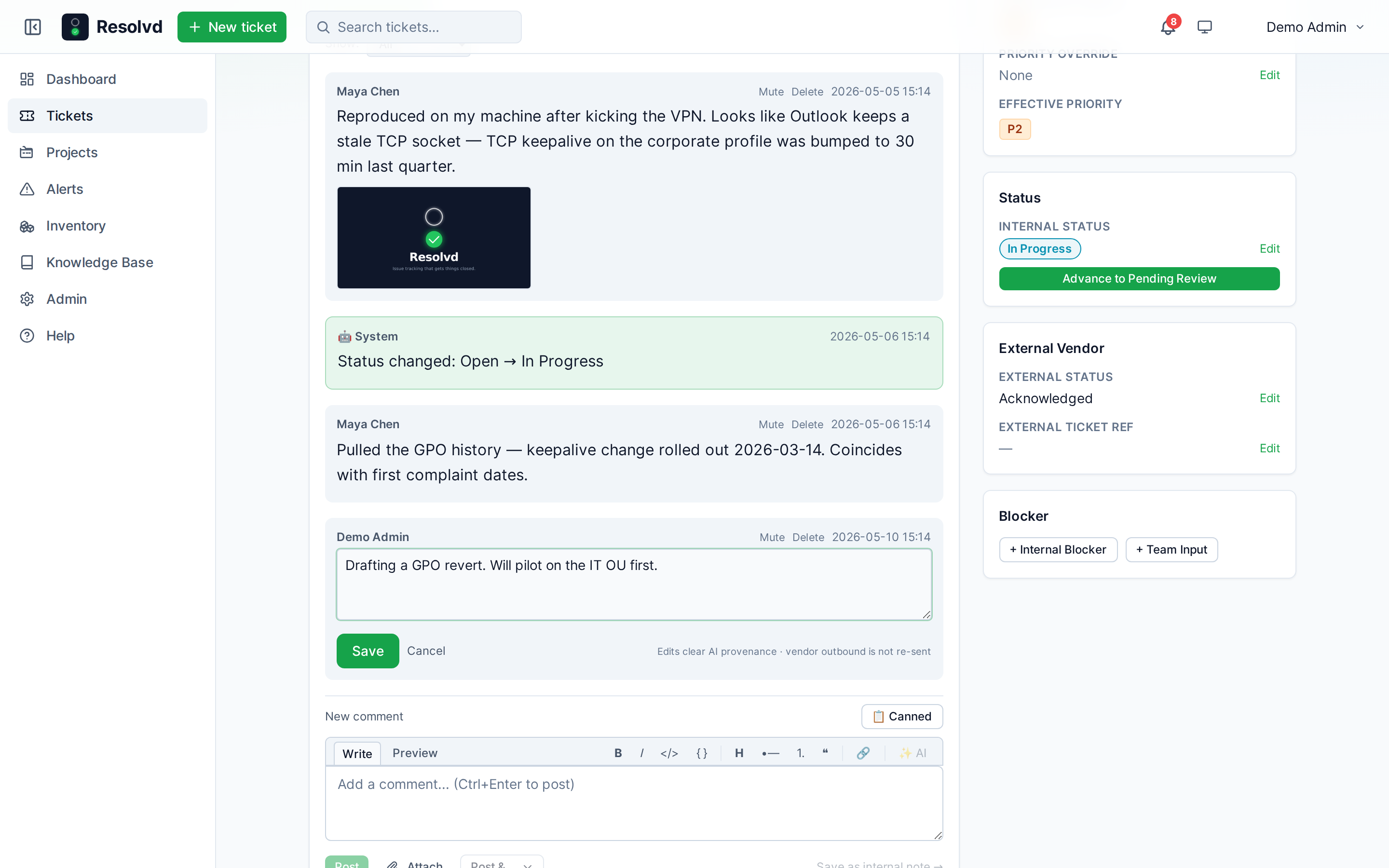
Editing clears any AI provenance on the comment (it’s no longer purely AI output once a human revises it) and writes a comment_edited audit entry.
The (edited) indicator is distribution-aware
If you post a comment, notice a typo five seconds later, and edit it before anyone has seen the original — no (edited) badge. The original never escaped, so there’s nothing to label as changed.
Once anyone other than the author has either (a) opened the ticket thread or (b) received a notification email about the comment, a per-comment distributed_at is stamped. From that point on, edits surface the (edited) badge.
The logic ignores vendor outbound — vendor recipients are out of band and the badge is a UI cue for internal readers. Vendor outbound is also not re-fired on edit: the vendor already has the original email; if your correction needs to reach them, post a follow-up comment.
Notes can be edited too
Same pattern, simpler rules. Notes never fan out to vendors or submitters, so there’s no distribution gate — any note edit always shows (edited). Author or Admin / Manager can edit; the original author gets the action by default.
Image attachments — inline preview + lightbox
Image attachments now render as thumbnails inline on comments and on the Attachments tab. Click any thumbnail to open a fullscreen lightbox with filename, Download button, and Esc / click-outside / × to close.
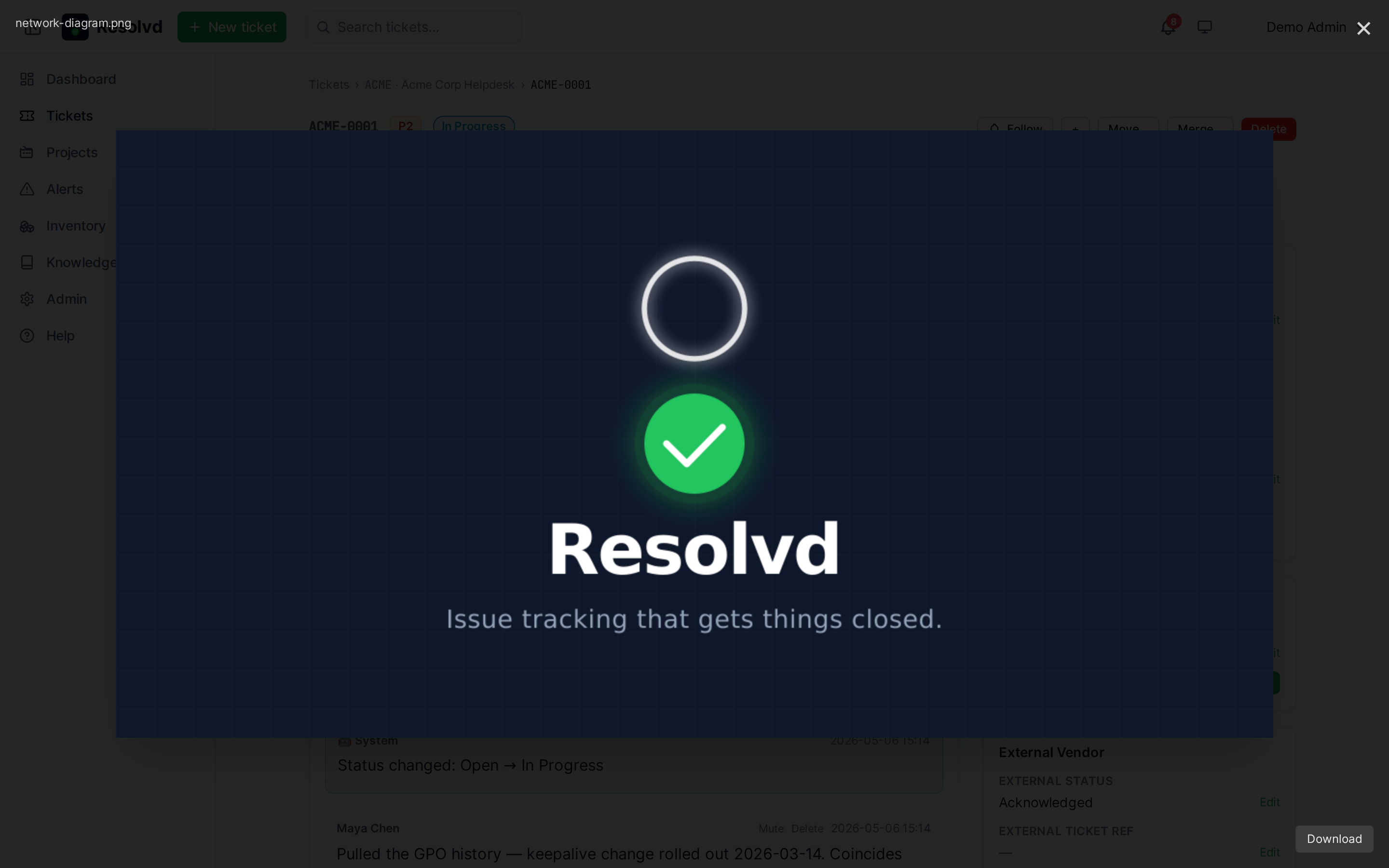
Non-image attachments keep their existing list / chip rendering. The lightbox uses the already-existing /api/attachments/:id/view endpoint — no new server work, just a UI that finally exercises it.
Project-level handler access — notes + Agent flag
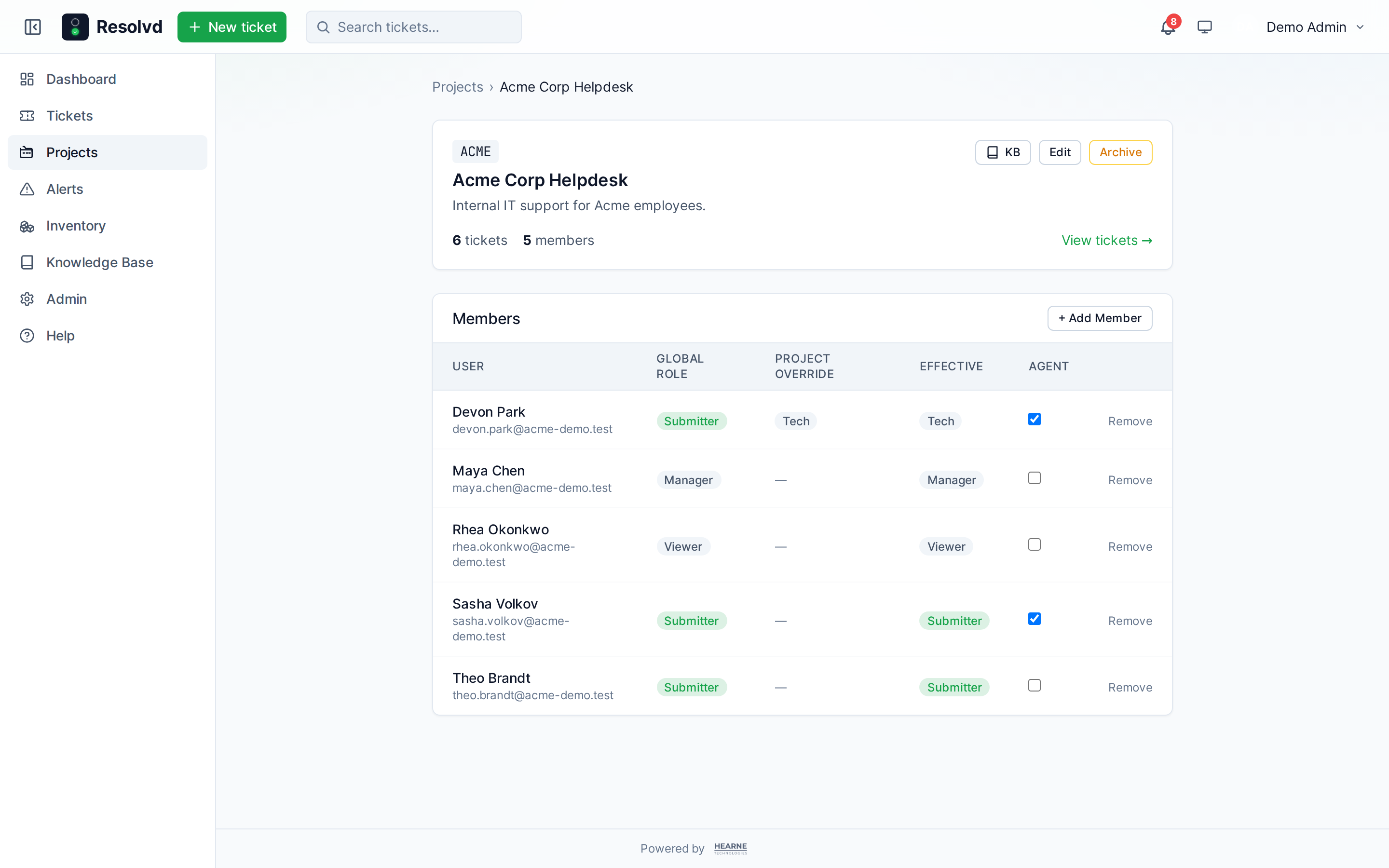
The Project member panel previously offered role overrides Admin / Submitter / Viewer. Manager and Tech are now valid overrides too, matching the global role list. Combined with the per-project Agent flag, you can express:
- A Submitter who happens to be a Tech-tier handler on Project A.
- A Tech globally who shouldn’t pick up tickets on Project B (toggle Agent off there).
- A Submitter who’s manually flagged Agent on a project so they receive
@agentsmentions and can post handler notes there.
The Notes tab access used to be global Admin / Manager / Tech only. It now also opens to project members with a handler role override or the Agent flag on the ticket’s project. The frontend tab visibility is driven by a server probe, so unauthorized viewers don’t see the tab at all.
Setting role override to Tech auto-ticks Agent (with the caveat that you can untick afterwards if a Tech on this project shouldn’t get assignments).
Agent-forwarded email → original sender attribution
Internal agents have long been forwarding stuff to the helpdesk inbox. Until v0.8.0, those forwards attributed the ticket to the forwarding agent — the original sender disappeared.
Resolvd now unwraps standard forward markers (Begin forwarded message:, Forwarded message, Original Message), extracts the inner From: header, and:
- Treats the inner sender as the submitter (
submitted_by). - Auto-assigns the ticket to the forwarding agent (matched against the outer sender’s user record).
- Audits both the creation + the auto-assign with
Created via forward from <agent> on behalf of <user>.
#PREFIX in the outer subject still routes the project. Inner sender must already be an active internal user; external-sender shadow contacts are a follow-up.
The detection requires the outer sender to be an internal Resolvd user, which guards against external senders spoofing a “forwarded” payload to impersonate someone.
Multi-scope inbox — pinned default landing project
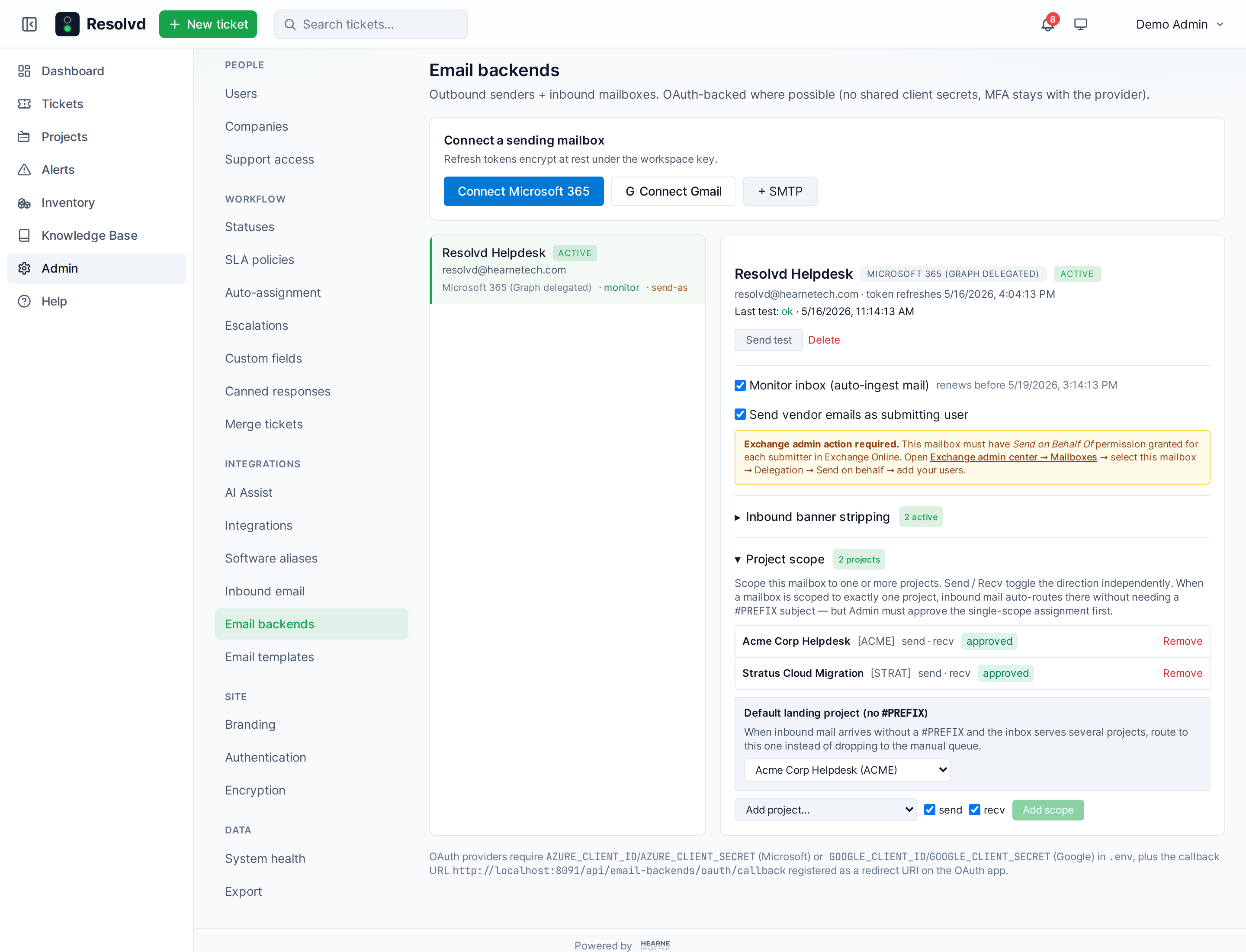
A shared inbox scoped to several projects previously dropped prefix-less mail into the manual queue. Now Admins can pin a default landing project per inbox: prefix-less mail auto-routes there instead.
Single-scope inboxes still auto-route as before; the picker only appears when an inbox has 2+ approved + recv-enabled scopes. Required project must be one of those scopes — if a later scope removal makes the default invalid, lookup degrades to “no route” gracefully.
awaiting_input → in_progress on inbound reply
When a vendor reply lands on a ticket sitting in awaiting_input, Resolvd now auto-transitions the ticket to in_progress and audits Auto-resumed: inbound reply received while awaiting input. Mirrors the existing gratitude-reopen path on resolved tickets, minus the gratitude filter — any reply unblocks a waiting ticket.
Works on both the tryAutoReply path (matched inbound replies on existing tickets) and the manual-queue match path (admin matches a queued email onto a ticket).
Lifetime AI token ledger
A small 3-cell card on Account → Preferences → AI Assist now shows your lifetime AI Assist usage: number of calls, total input tokens, total output tokens. Each cell is a SUM over the per-comment / per-ticket snapshots Resolvd already captured at apply time. Edits and deletes don’t subtract — the snapshot reflects what was actually consumed.
Only renders when the user has at least one AI call on record. Useful when you’re paying for your own API key and want to know the running total.
Daily digest delivery hour
email_digest=daily previously sent at 09:00 local. New per-user notification_digest_local_hour (0–23) lets each user pick when they want the daily digest. AccountPreferences exposes the selector only when you’ve picked the daily cadence.
Outbox cleanup
notification_outbox rows that sat unsent for >30 days are now hard-deleted on every flush tick. Backstops the “user toggles digest off after a row buffered” orphan case so the table stays bounded.
Build identity + manual update check
Self-hosters now have a way to tell at a glance what’s actually running and whether a newer release is out. Admin → System health gets a Build info card at the top showing the running version, short commit, and built-at timestamp.
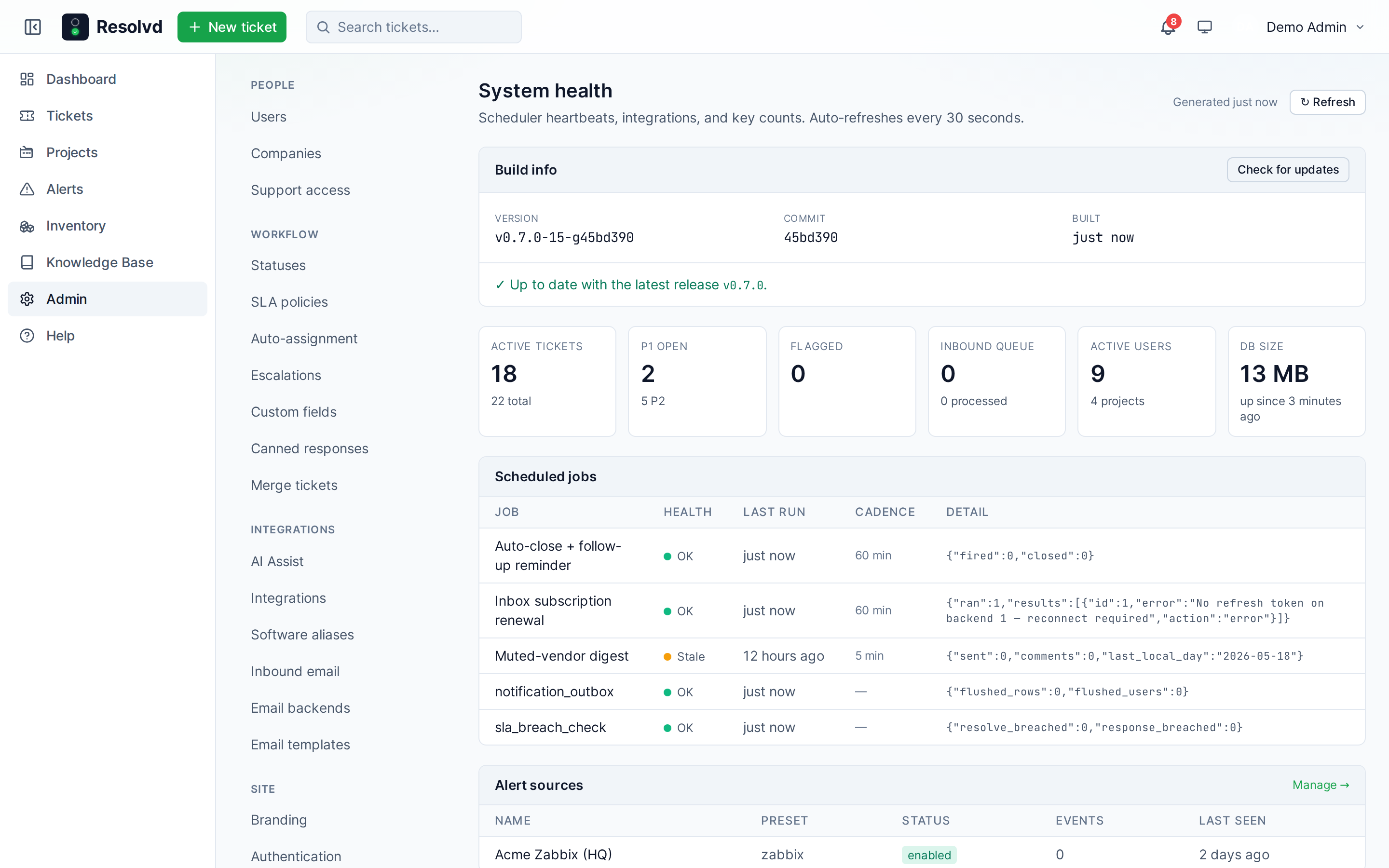
Backend Dockerfile reads APP_VERSION / APP_COMMIT / BUILT_AT build-args, exposed by a public GET /api/version (no PII; safe for health probes). A scripts/build-with-version.sh wrapper stamps the args from git describe --tags --always --dirty + short SHA + UTC timestamp so contributors get accurate values without manual fiddling.
The card has a Check for updates button that polls github.com/joshhearne/resolvd releases/latest and compares against the local semver. Reports one of:
Up to date with the latest release v0.8.0.New release available: v0.9.0 — published 2026-06-12You're ahead — pre-release or local build.Couldn't reach GitHub: <error>(homelab / airgapped installs see this without consequence)
No background phone-home. The check fires only when an admin clicks the button. Airgapped installs never reach out unless someone asks them to.
Mobile-friendly Help page
The role-pill columns on the Help page’s Feature rows previously wrapped horizontally even on narrow viewports — squeezing long descriptions into skinny columns. Pills now stack vertically below 640px so the description text gets full width. Tablet+ keeps the original layout.
Smaller wins
VALID_ROLESon project members:ManagerandTechare now accepted (frontend offered them, backend rejected — straight bug fix).- Note mentions no longer accidentally stamp
distributed_aton the comments table when a note id collides with a comment id (fixed viakind: 'note'onfanoutMention). - Help page documents all of the above with refreshed screenshots.
Upgrade notes
- New columns:
comments.edited_at,comments.distributed_at,ticket_notes.edited_at,email_backend_accounts.default_inbound_project_id. AllIF NOT EXISTS, no manual migration needed. - One-time backfill on first startup:
UPDATE comments SET distributed_at = created_at WHERE distributed_at IS NULL AND created_at < NOW() - INTERVAL '1 minute'. Ensures editing old comments still surfaces(edited). - No env var changes.
Full changelog on GitHub.